How to play
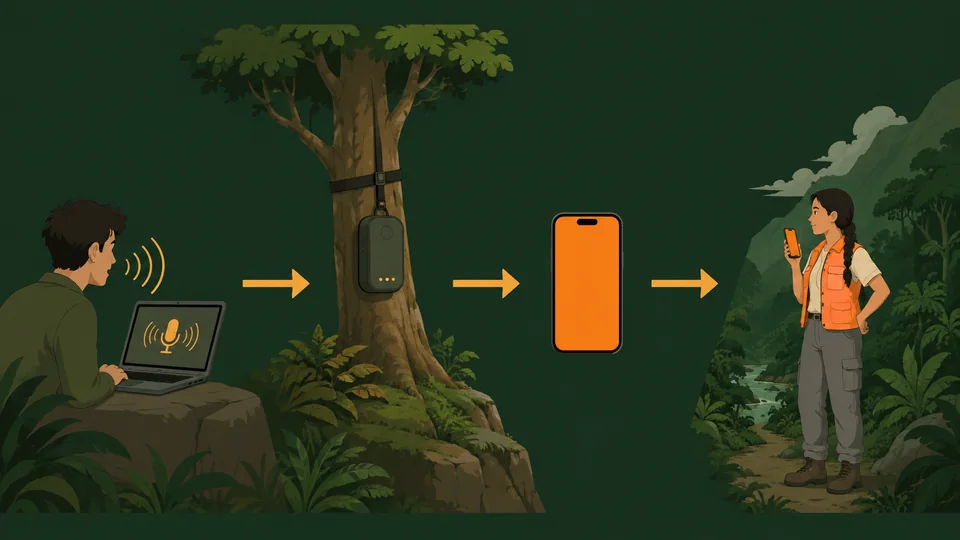
You play as Base: the expedition coordinator with the scan overlay and a phone line to Cara. You can steer her directly with the keyboard, or ring her and tell her what to do. Both work at the same time.
Starting the game
- Click Play (or Play fullscreen) on the home page. The jungle takes a few seconds to grow.
- Choose New expedition, or Continue if you have a save. Progress saves automatically in this browser.
- Click the game to capture the mouse. Esc releases it and opens the menu. F or the ⛶ button toggles fullscreen at any time.
http://localhost or https:// (not opened as a file) so that modules, the microphone and pointer lock work. See the README for a one-line server.Controls
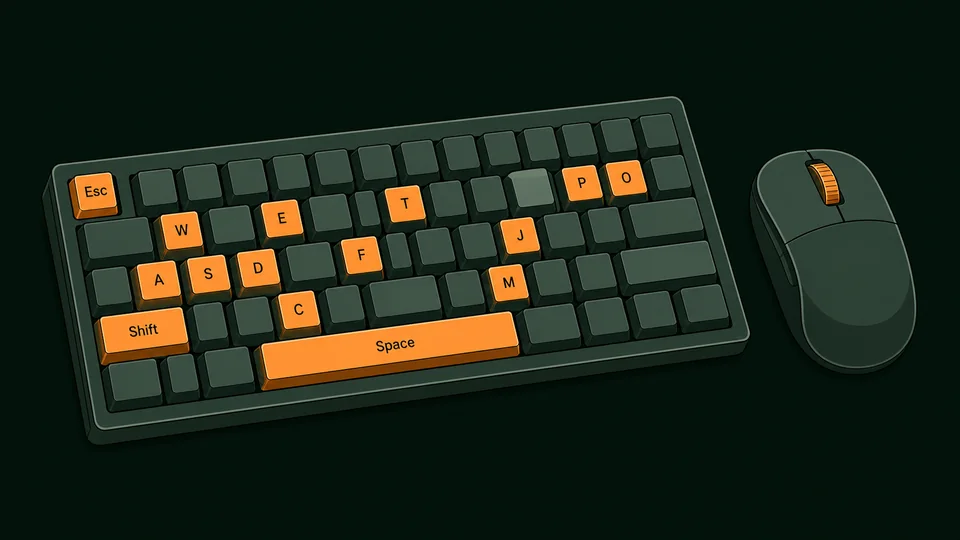
| Key | Action |
|---|---|
| W A S D / arrows | Move, relative to the camera. Cara turns to face where she is going. |
| Mouse | Orbit the camera. Wheel zooms in and out. The camera drifts behind Cara while she runs (can be turned off in Settings). |
| Shift | Sprint. |
| C / Ctrl | Walk carefully (good on logs and ledges). |
| Space | Jump. Jump at a ledge or a stone block to mantle onto it. |
| E | Interact with the highlighted object: pick up, read, place, enter. |
| P | Show or hide the phone. Hiding the phone does not end a call. |
| T | Jump straight to the call screen. |
| M J O I | Open the map, the journal, the objectives, or the items you have found on the phone. |
| V (hold) | Push-to-talk during a call, if you chose that microphone mode. |
| F | Toggle fullscreen. |
| Esc | Pause menu / release the mouse. Also closes the phone. |
Traversal
- Mantling. Run at a waist-high wall and Cara steps up. For anything higher, jump towards it: if the top is within reach (about 2.3 m) she grabs it and pulls herself up. The east cliffs are climbed this way, block by block.
- Steep ground cannot be walked up; the valley walls are the edge of the world. Look for stone blocks, the log, or the dirt trail.
- Swimming. Walk into deep water and Cara swims (slowly; she is not a fan). Swim to the bank or a block to climb out. The river island is reached this way.
- Falling. Short drops are fine. Big drops hurt; very big ones knock her out and she wakes on the last safe ground. Health recovers over time.
- The log crosses the river mid-valley. Walk (C) if you keep falling in.

Home: Marginalia (the prologue)
New players start on Cara’s narrowboat on the canal, the evening before she leaves (Start at home on the front page, or play.html?level=home). Nothing here can hurt you and nothing is timed. The objective card walks through the basics in eight optional steps, each with a tip underneath:
- Follow the towpath east to the humpback bridge (movement, running).
- Hop onto the bridge parapet (step-up and mantling).
- Walk west and cross Wootton Lock on a gate footboard (careful walking, C).
- Swim across to Arthur’s bench on the far bank (swimming, climbing out).
- Back on the boat, put the kettle on (E to interact).
- Read the first page of Mum’s notebook (the Journal).
- Open the phone (P) and, with a key, call Cara for a rehearsal of the sat-link.
- Turn in at the cabin door. The next morning is Chapter One.
Everything on the boat can be examined: the letter, the chess game with her dad, the ropes, the photo, the record, Benny’s postcard. Read them for the story, or skip straight to bed; the level is yours to wander.
The goal of Chapter One
- Read your mother’s notebook at the survey camp (south end, where you start).
- Find the three Sun Stones: on the Watcher’s ledge above the east cliffs, on the river island, and inside the ruined shrine in the west grove. Stelae (carved standing stones) near each one tell the legend; reading them fills your journal.
- Climb the temple stairs at the north end, next to the waterfall, and place the stones on the altar. The gate sinks into the floor.
- Walk through the gate onto the Sunken Stair. Six hidden jade tokens are scattered around the valley for the completionists.
The phone’s Map shows the scan overlay with landmarks, Sun Stones and Cara’s position; Objectives tracks the list; the Journal collects what she has read.
The phone
Cara also talks to herself: effort sounds when she climbs or lands, muttered remarks when she finds something, voice-diary entries when she reads her mother’s notes or a stela, and field-note readings for anything she has examined (phone → Items, or the ▶ buttons in the Journal). These recorded lines pause while you are on a call, and can be switched off in Settings.
Press P. The home screen has a big Call Cara button and the apps. During a call the screen shows a live transcript of both sides, a waveform, mute, the talk button, and End. You can hide the phone and keep playing; the call carries on and a small pill in the corner shows it is live. Cara’s speech is subtitled at the bottom of the screen (Settings → subtitles).
Playing by voice
Voice runs on Google’s Gemini Live API, straight from your browser to Google. You bring your own API key; nothing goes through any other server.
Setting it up
- Create a key at aistudio.google.com/apikey. The free tier is enough to try it.
- Press Call Cara (home page, or in-game phone). The first time, a dialog asks for the key. It is saved in this browser’s local storage only. You can view, change or remove it later via ⚙️ Settings.
- Allow the microphone when the browser asks.
- She answers. Talk normally. She will interrupt herself if you start speaking (open-mic mode).
Model and voice
The default is Gemini 3.1 Flash Live, Google’s newest native audio-to-audio model, which sounds the most natural and supports Cara’s actions. Settings also offers the Gemini 2.5 native-audio previews and the half-cascade Live 2.5 Flash model (very robust with actions), plus Cara’s voice. If Google retires a preview model, pick another from the list or type any model id.
What you can say
Cara understands plain language. Behind the scenes, these map to actions she can take in the world. Some examples:
| You want | Try saying |
|---|---|
| Move | “Walk forward ten metres.” “Go left a bit.” “Head north.” “Run!” “Stop.” |
| Navigate | “Go to the river.” “Head for the temple.” “Take me to the camp.” “Go to the waterfall.” “Walk to the stela.” |
| Look | “What can you see?” “Where are you?” “Look around.” “Which way is the temple?” |
| Inspect | “Inspect the surroundings.” “Have a look at that stela.” “What’s on the altar?” “Check the notebook.” |
| Interact | “Pick it up.” “Read it.” “Place the stones.” “Go through the gate.” |
| Jump / climb | “Jump.” “Climb that block.” “Jump onto the ledge.” |
| Turn | “Turn left.” “Face north.” “Turn around.” |
| Status | “How are you doing?” “What’s the objective?” “How many stones have we got?” |
| Pace | “Walk from now on.” “Sprint everywhere.” |
| Camera | “Let me see your face.” “Give me a wide shot.” “Reset the camera.” |
| Just talk | “Tell me about your mum.” “Why did you leave the university?” “What do you make of this place?” |
- Long walks report back: when she arrives (or gets stuck) the game tells her and she tells you.
- Landmark names she knows:
camp,log bridge,river,island,east cliffs,ledge,west shrine,waterfall,temple,altar. Anything she has just seen with “look around” works too. - Touching the keyboard while she is walking somewhere cancels the voice command; you are in charge.
- She is a person, not a remote control. Ask for something daft and she will say so, then usually do something sensible instead.
Calling from the home page
The Call Cara button on the home page rings her off duty, the evening before the descent. No actions there, just conversation: the expedition, her mother’s notebooks, climbing, her narrowboat, whatever you like.
Troubleshooting
- “Google rejected the API key.” Check the key in ⚙️ Settings and that the Gemini API is enabled in Google AI Studio for that key.
- “The voice model was rejected.” Preview models come and go. Pick another model in Settings.
- No microphone prompt. The page must be on
localhostorhttps. Check the browser’s site permissions for the microphone. - She hears herself / keeps stopping. Use headphones, or switch to push-to-talk.
- Low frame rate. Quality is set to Auto by default and drops itself if needed; set it to Medium or Low in Settings for older machines.
- Nothing loads. The game fetches Three.js and fonts from CDNs, so it needs an internet connection on first load.
- Long calls. The sat-link renews itself every few minutes behind the scenes; you may see “Renewing sat-link…” briefly. Calls carry on for as long as you like. If the line drops, it reconnects automatically and picks up where you were.
- Cara moves stiffly. Her motion-capture animation library (4 MB, CC0 by Quaternius) loads from jsDelivr; if it cannot be fetched the built-in animation is used. Check Settings → Game → “Motion-capture animation rig” and reload.